Subscriptions are designed to be forgotten. A free trial turns into a monthly charge, an annual renewal arrives eleven months after you last thought about it, and a price rise slips through in an email you never opened. Each charge is small, so none of them feels worth chasing. Together they add up.
In a 2026 survey of 1,272 people in the United States by Self Financial, 59.9% said a paid subscription was going unused in a typical month, and those people had an average of 2.6 unused subscriptions. The survey put the average monthly value of unused paid subscriptions at $26.79, or about $321 a year spent on nothing.
A subscription audit fixes that in about half an hour. This guide shows you how to do one properly, and the free Subscription Audit tool can do the finding and the arithmetic for you, without your bank data leaving your browser.
Key takeaways
- Use 12 months of transactions, not one statement. Annual and quarterly renewals only show up over a full year.
- Convert everything to a yearly cost. $12.99 a month sounds small; $155.88 a year is a decision.
- Look for three problems: charges you do not use, duplicates, and services that overlap.
- Cancel before the renewal date, keep the confirmation, and check app store subscriptions separately.
- Repeat the audit every quarter. It takes minutes once you have a register.
Why subscriptions are so easy to lose track of
- Free trials that convert to paid automatically unless you cancel in time.
- Annual billing, which makes a service invisible for eleven months.
- Several payment routes: some services bill your card, some go through an app store, some through a payment wallet. No single statement shows them all.
- Price increases that are announced by email and applied automatically.
- Family and team plans that overlap with individual ones, so the same service gets paid for twice.
- Small amounts, which our brains file as not worth the effort. That is exactly why they survive.
How to do a subscription audit in 30 minutes
1. Export 12 months of transactions
Download a CSV of transactions from every card and bank account you use for bills, plus any payment wallet. Most online banking offers a CSV or spreadsheet export. Twelve months matters because a monthly statement will never show the annual renewals, and those are often the biggest charges.
2. Find the recurring charges
A subscription looks like the same merchant, a similar amount and a regular gap between charges: weekly, monthly, quarterly, twice a year or annually. Sort by merchant and scan for repeats. Watch for merchant names that do not match the brand you know, since billing names are often a parent company or a payment processor.
3. Convert every charge to a yearly cost
Monthly × 12, weekly × 52, quarterly × 4. Seeing the annual figure changes decisions. A $9.99 news subscription you open twice a month is costing you nearly $120 a year.
4. Flag duplicates and overlaps
Two charges from the same vendor a few days apart usually means two accounts or two plans. Overlaps are subtler: three video streaming services, two cloud storage plans, a music service paid individually and as part of a family plan.
5. Decide: keep, downgrade, cancel or renegotiate
Ask three questions of each line. Did I use it in the last 30 days? Would I sign up again today at this price? Does something else I pay for already do this? Two "no" answers usually means cancel. For services you use but less than you pay for, look for a cheaper tier, or switch annual plans to monthly so you can drop them in quiet months.
6. Cancel properly
Cancel before the next renewal date, and take a screenshot or keep the confirmation email. For services billed through your phone, cancel in the app store rather than just deleting the app, because deleting an app does not stop the billing.
7. Set reminders
Put the renewal date of every annual subscription and the end date of every free trial in your calendar, a week early. That single habit prevents most of the waste.
A worked example
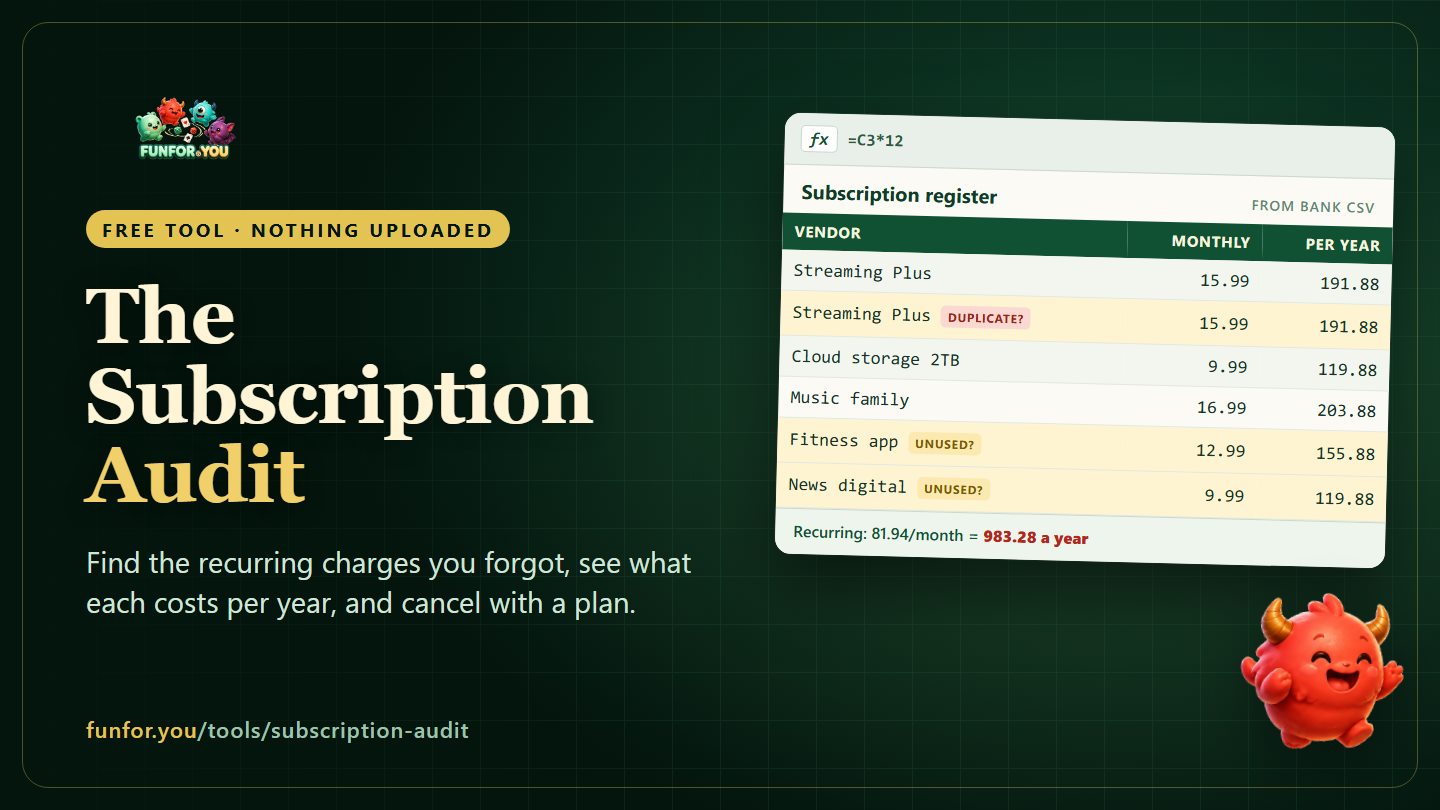
Here is a small but typical household register after an audit of twelve months of card transactions:
| Subscription | Monthly | Per year | Flag |
|---|---|---|---|
| Streaming Plus | 15.99 | 191.88 | |
| Streaming Plus (second account) | 15.99 | 191.88 | Possible duplicate |
| Cloud storage 2TB | 9.99 | 119.88 | |
| Music family plan | 16.99 | 203.88 | |
| Fitness app | 12.99 | 155.88 | Not used in 3 months |
| News digital | 9.99 | 119.88 | Rarely read |
| Total | 81.94 | 983.28 |
Cancelling the duplicate streaming account, the unused fitness app and the news subscription saves 38.97 a month, or 467.64 a year, almost half the total, without giving up anything that was actually being used.
Businesses have the same problem, only bigger
For a small business, subscription creep looks like software seats still paid for people who left, two tools doing the same job in different teams, and annual contracts that renew automatically because nobody owned the renewal date. The audit is the same, with two additions: give every subscription an owner, and record the renewal date and notice period, because business contracts often require notice 30 or more days before renewal.
Once you have the annual figures, put them into your planning. They belong in the fixed costs of a cash flow forecast and in the software line of a budget vs actual tracker, so the next price rise is visible when it lands.
Let the free tool do the searching
The Recurring Subscription Audit & Leak Detector does steps 2 to 4 for you. Import a CSV with a date, a merchant or description and an amount, or add transactions by hand. It then:
- detects the billing frequency (weekly, monthly, quarterly, semi-annual or annual) and converts each subscription to a monthly and annualised cost;
- groups spending by category, such as software, entertainment, productivity, hosting and marketing, and marks the ones that need review;
- flags possible duplicates within a duplicate window you choose, from 0 to 30 days;
- shows recurring spend by category and a list of costs to review;
- exports an Excel-compatible XLSX register and a one-page recap image.
Your audit is processed locally in your browser. The transactions you import are not uploaded, and nothing is stored when you close the page. If you want extra reassurance, delete account numbers and balances from the CSV before importing; the tool only needs the date, merchant and amount.
Frequently asked questions
How often should I do a subscription audit?
A full audit once a year, using twelve months of transactions, and a quick check every quarter. Also check before any large annual renewal.
How do I find subscriptions billed through my phone?
On an iPhone, open Settings, tap your name, then Subscriptions. On Android, open the Google Play Store, tap your profile picture, then Payments & subscriptions, then Subscriptions. Cancel there; deleting the app does not cancel the billing.
What counts as a subscription?
Anything that charges you automatically on a schedule: streaming, software, cloud storage, apps, memberships, delivery passes, news, and many "free" services that include a paid tier. Utilities and loan repayments recur too, but they belong in your budget rather than your subscription audit.
How do I handle annual subscriptions?
Divide the annual price by twelve to compare it with monthly services, and put the renewal date in your calendar a week early so you can decide before it renews.
Is it safe to use my bank CSV in the tool?
The tool processes the file in your browser and does not upload it. You can also strip out anything it does not need before importing: it only uses dates, merchant names and amounts.